Sending Video to OBS with Spout2
This document was written for v0.26.0-exp.1.
Overview
Spout is a mechanism that lets Windows applications hand GPU textures directly to one another. Sending the Studio app's video to OBS over Spout delivers it with alpha (transparency) intact, without going through window capture or game capture. Make the background transparent and you can composite just the avatar over other material in OBS.
While Spout is enabled, the Studio app's window stops updating. The video is rendered to the texture handed to OBS instead, so a frozen-looking window is not a malfunction. Check the video in the OBS preview.
What You Need
- OBS Studio
- Spout2 Plugin for OBS Studio — it does not ship with OBS, so get it from the releases page and install it separately. Restart OBS after installing.
Studio-Side Settings
- Open the Live Project page in the Remote app.
- Select Screen under SETTINGS (①).
- Set Background Type to SolidColor (②).
- Open Background Color (③) and set its alpha to 0 as described below.
- Turn Use Spout on (④).
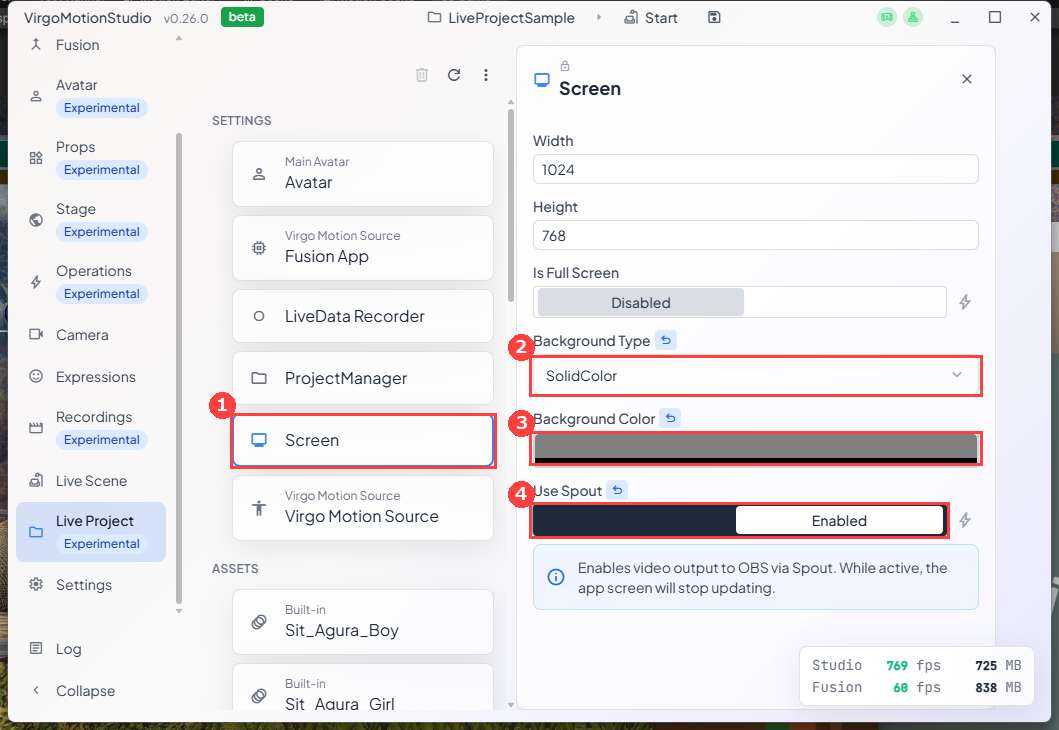
Width / Height is the resolution of the video sent over Spout.
Making the Background Transparent
Clicking Background Color opens the color picker. Setting A (alpha) to 0 removes the background entirely.
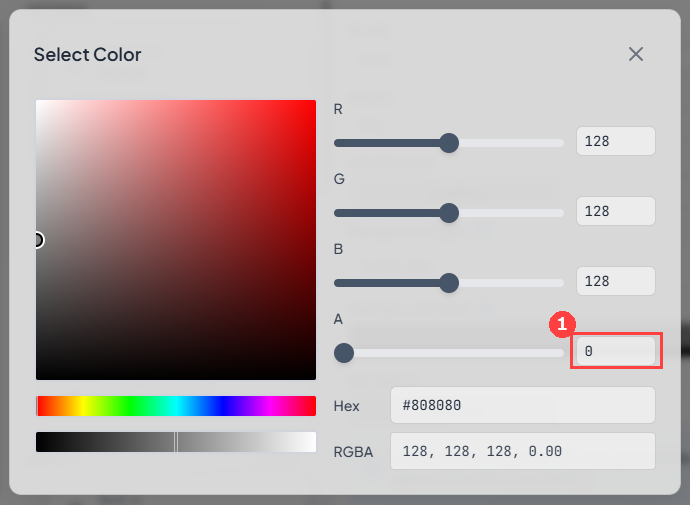
Alpha is carried in the output only when Background Type is SolidColor and Background Color's alpha is below 1. With Skybox, the sky shows through as-is and alpha is always 1 (opaque).
Alpha is not kept with an opaque background because areas where semi-transparent objects are drawn would end up with alpha below 1, punching holes in the video.
Only the camera's background becomes transparent. If a set such as a room is standing on the stage, that model still shows. To isolate the avatar, unload the set on the Stage page.
OBS-Side Settings
- Add Spout2 Capture from the + in Sources.
- Choose LiveStudio in the properties' SpoutSenders (①).
- Set Composite mode to Default (②).
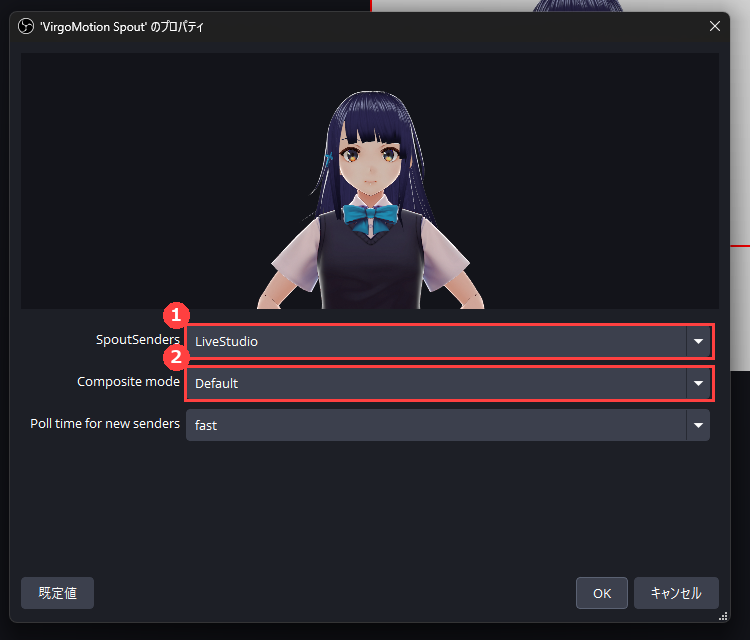
The sender name is fixed as LiveStudio. It does not change when you switch stages (sets), so the OBS source never drops out.
Checking the Result
Place a color source or background image below Spout2 Capture and you can confirm that the background is gone and only the avatar is composited on top.
Troubleshooting
| Symptom | What to check |
|---|---|
LiveStudio doesn't appear in SpoutSenders | Is the Studio app running, and is Use Spout on? If you enabled it while OBS was already open, reopen the properties. |
| The background is filled with black | OBS's Composite mode is set to Opaque. Change it to Default. |
| The background isn't transparent — the sky or a room shows | Background Type is still Skybox, or a set is standing on the stage. |
| Dark fringes appear along the edges | Compare Composite mode between Premultiplied Alpha and Default. |
| The Studio app's screen freezes | This is expected while Spout is enabled. Check the OBS preview instead. |
Related
- Live Project — The page that holds project settings such as Screen.
- Stage — Loading and switching sets.