App Takes a Long Time to Start
The downloaded app can take more than 30 seconds to launch. In most cases this is caused by a check from Windows security features (SmartScreen and Microsoft Defender) — it is not a problem with the app.
Solution
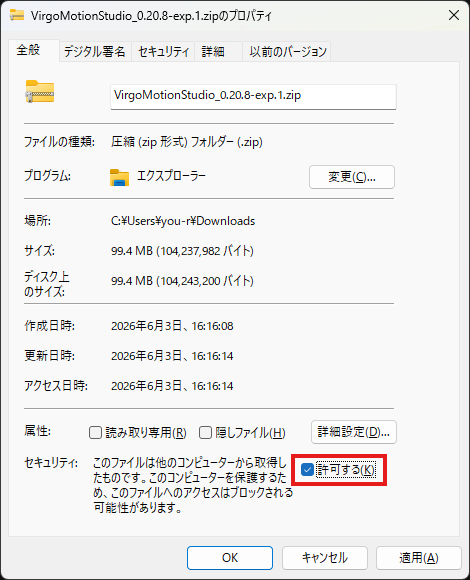
Unblock the zip before extracting it. Do this before extracting.
- Right-click the downloaded zip file and open Properties
- If there is a "This file came from another computer…" item near the bottom, check Unblock to its right
- Click OK
- Then extract the zip
This keeps the files inside from being tagged, so the first-launch scan wait is less likely to occur.
If the Unblock item is not shown, the file is already untagged, so you can extract it as is.
If It's Still Slow
- An unstable PC/internet connection can make the SmartScreen check take longer. Try again on a stable network.
- Antivirus software (including ones other than Defender) scanning can also be the cause. Excluding the extraction folder from scanning may help, but configure such settings at your own risk.